
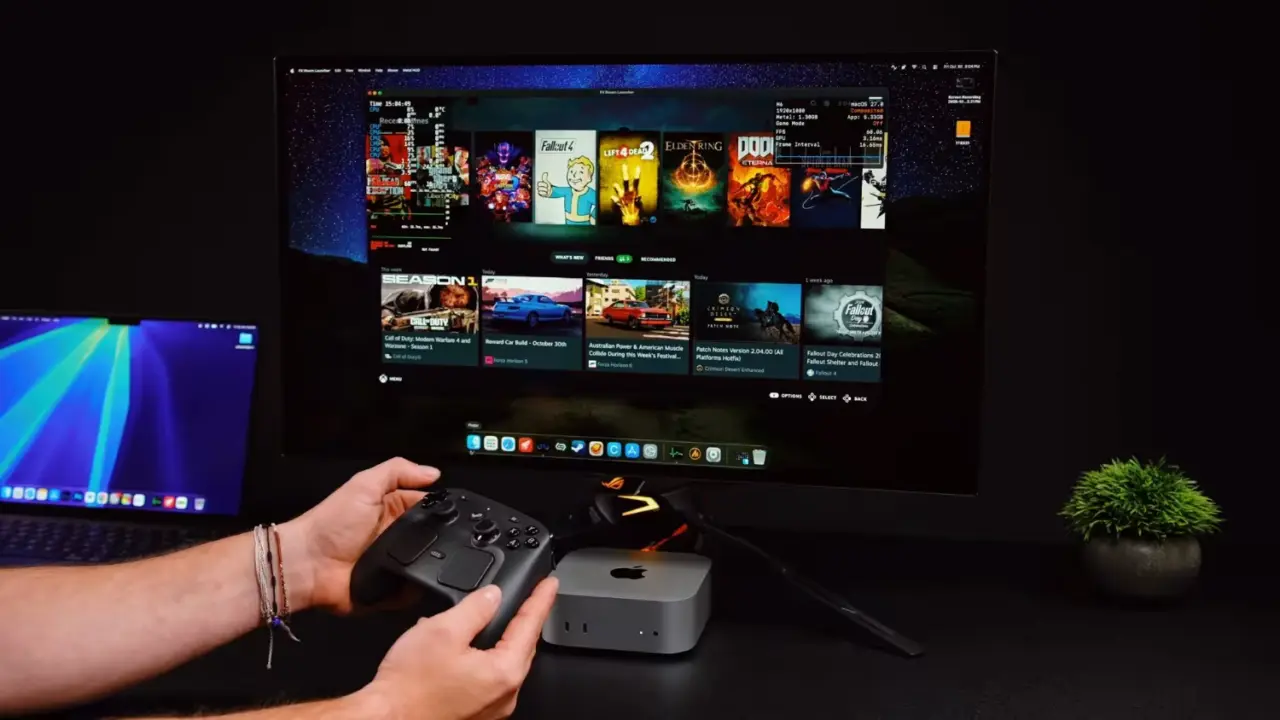
Valve's SteamOS is now compatible with Apple Silicon Macs, offering PC gaming on the macOS platform for Mac users who were previously limited to emulation or Windows Boot Camp alternatives. This is significant because it opens up the possibility for M-series chip owners to enjoy a huge library of Windows-only games on macOS through a Linux-based gaming system. This development broadens the reach of SteamOS beyond Steam Deck devices and opens up new possibilities for high-performance gaming on Apple laptop computers.
Open-source tool enables Linux gaming OS on macOS with native-like performance
This achievement is made possible thanks to the FX Steam Launcher, an open-source GitHub project that offers virtualization for SteamOS on macOS without making any changes to the macOS system itself. The software sets up a virtual machine environment that separates the Linux OS from the macOS environment of the Mac. This helps keep the Mac system stable while you're gaming. You're effectively running the SteamOS as a guest OS, which means you can enjoy Valve's gaming interface and game controller support without touching your main computer.
Under the hood, the technical solution uses a 6-step conversion system that makes the transition between PC games on Windows and Apple computers possible. The DXVK (DirectX to Vulkan) conversion is used to translate DirectX calls into Vulkan calls, while Metal drivers such as KosmicKrisp Metal 4 and MoltenVK take over the rendering task. FEX (FEXulator) translator handles the conversion of CPU instructions from x86 to Arm64 in real time, enabling Windows binaries to run on Apple's Arm-based processor.
When we test the setup on an M4 Max MacBook Pro with 32GB of unified memory, we see some impressive results. In The Witcher 3, we see more than 70 FPS in 1080p. Left 4 Dead 2 hits more than 100 FPS.
Fallout 4 hits 60 FPS. We also see more than 70 FPS in Red Dead Redemption after shader compilation. (Note: People with only 16GB of unified memory may face some stability problems when running high-end games.)
These results indicate that it is possible to get native-like performance on Apple Silicon with SteamOS, as long as you have enough resources to back it up. If you have 32GB of unified memory, you should be able to play most of the supported games without issues. If you only have 16GB of unified memory, expect some performance bottlenecks. In any case, this offers a good option for Mac users to access the Steam library without using dual-boot or having a dedicated gaming PC.
FX Steam Launcher is not an official Valve product. It is an open source GitHub project that virtualizes the environment. Do not confuse the tool with the OS itself.
im assuming anti cheat will break everything immediately 😅
The article mentions 32GB unified memory is recommended. Does the 16GB configuration fail to boot or just stutter in high settings?
Stability issues are reported for 16GB. High end games consume too much memory leading to crashes or severe bottlenecks. 32GB is required for consistent play.
70 fps in The Witcher 3 is impressive for a VM. The translation overhead from x86 to arm64 via FEX usually costs significant performance. This number seems optimistic.
my 16gb m2 macbook air is already overheating just browsing this thread 💀
I want to see independent benchmarks for Left 4 Dead 2. The 100 fps claim needs verification across multiple titles before I trust the rendering pipeline.