
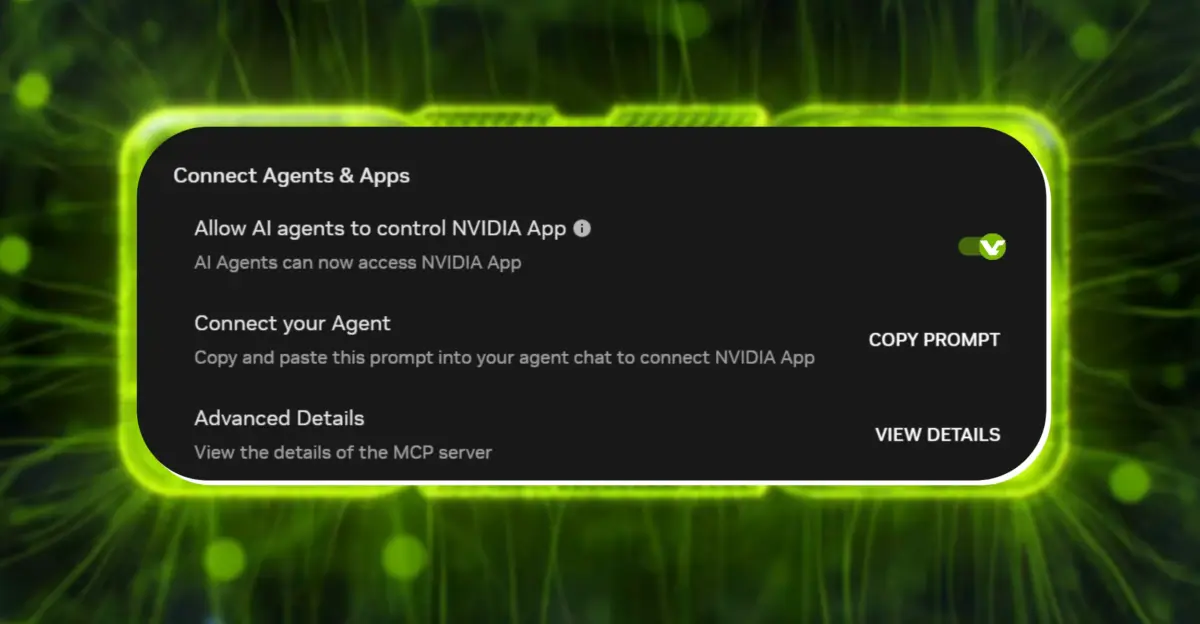
NVIDIA released their new NVIDIA App 11.0.9.565. This new update has an interesting change regarding the relationship with AI and the app. This is important as this update enables by default a local server for AI agents to access and control your gaming settings and overlays (without explicit permission).
New update allows AI agents to control settings and overlays by default
If you have your PC managed by AI automated helpers, this new feature is likely to be appreciated. Otherwise if you prefer the manual approach this is important to note the new permissions.
This new update introduces a new local Model Context Protocol (MCP) server to the application. The idea behind the server is to establish a connection between compatible AI helpers and the NVIDIA App to let them send commands to change settings like your games graphics presets or control the ShadowPlay recording tool.
This new feature will be available from the moment you install the new NVIDIA App 11.0.9.565, as it will be enabled automatically (local server will start running in background). The local MCP server is listening on the local loopback address (127.0.0.1) with the default port for HTTP connection (13508) to ensure the interface can only be reached from applications installed on the same local machine (external network is isolated).
Some specific features such as launch games, change graphics settings, control recording features are supported for a standardized interaction with AI from the NVIDIA ecosystem. If you don't want AI agents to access and control features of your NVIDIA App you can deactivate it in the settings menu.
Just go to Settings > Features > Connect Agents & Apps and uncheck "Allow AI agents to control NVIDIA App". This way you have full control to determine if your system will be accessible to compatible AI automated helpers commands.
Discussion
0 comments
Log in to join the thread with a thoughtful take, question, or correction.