

MSI released a beta update for its Afterburner utility that gives users a clearer view of how graphics cards manage power and speed. This change matters because it replaces guesswork with visual data, helping overclockers and undervolters tune their systems with more precision. The new tool tracks voltage and frequency changes in real time, showing exactly how the GPU responds to different loads.
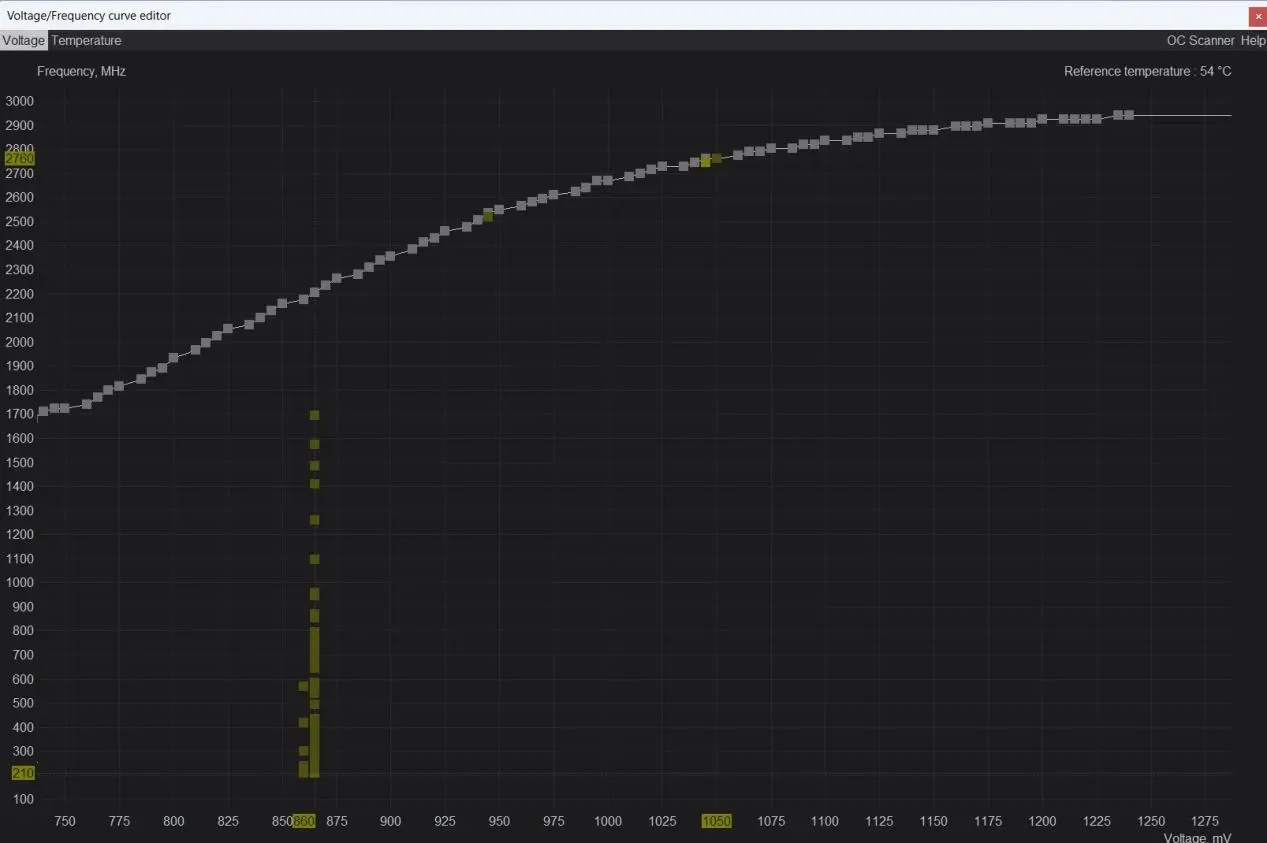
Beta software visualizes voltage and frequency changes to help users tune systems
The update arrives in version 4.6.7 beta 4 of the software. It targets users who modify the voltage/frequency curve editor to push hardware performance. The developer describes the feature as a way to record and visualize the clock frequency and voltage change trajectory of NVIDIA GeForce RTX graphics cards under actual load in real time. This transparency helps users understand the internal behavior of their GPU boost algorithms.
Users activate the new heatmap by pressing the M key while in the curve editor. The software records the most recent 256 voltage-frequency sampling points to build the visual map. This data density allows for a detailed look at how the GPU transitions between power states. The tool captures enough points to reveal subtle patterns that standard monitoring might miss.
The heatmap reveals distinct architectural differences between the RTX 4090 and the RTX 5090. The RTX 4090 shows a distribution concentrated on preset curve nodes, indicating discrete switching steps. In contrast, the RTX 5090 captures many intermediate sampling points between adjacent nodes. This smooth continuous transition suggests the Blackwell architecture switches voltage and frequency approximately 1000 times faster than previous generations. The developer notes that this intermediate scaling helps reduce instantaneous power spikes during load changes. We looked at the last MSI Afterburner update earlier while tracking NVIDIA launches, and the focus on balance and stability themes continues here.
The beta software is available for testing now. The feature provides a concrete method to verify GPU boost behavior without relying on external benchmarks. Users can now see the direct impact of their curve adjustments on voltage and frequency stability.
Discussion
0 comments
Log in to join the thread with a thoughtful take, question, or correction.