
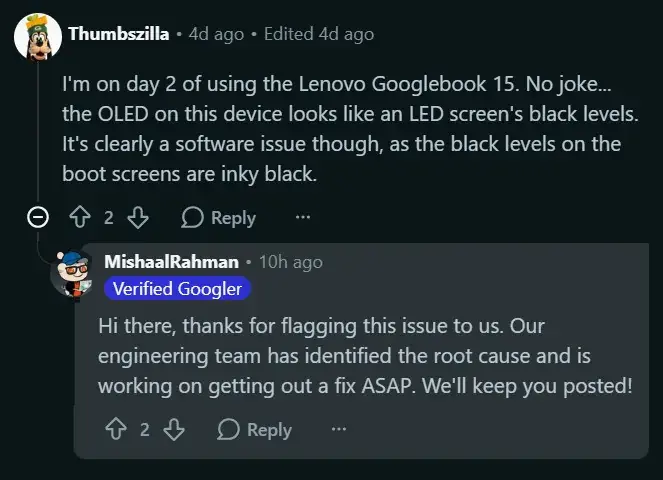
Googlebook with OLED screens render dark grey instead of a clean black. We have a specific set of Acer and Lenovo devices that are having an issue with their display, much to the dismay of those looking for high contrast hardware. However, it's not an issue with the physical display panels, it's a simple matter of faulty logic in software. So, Google has confirmed the bug and they're working on a fix for the issue so you can get back to enjoying the proper visual quality.
Googlebook OLED screens display dark gray instead of pure black due to software bug
Essentially, what's happening is that the OS/Driver firmware isn't properly shutting off the individual OLED pixels. As people explained in a Reddit thread, when you go to use the device and see dark spots on the screen, they'll actually have a grey glow to them. However, when we run the hardware tests, it's revealed that the screen actually works as it should during the boot phase. So, it's purely a software related issue. That's a big deal, since it means it's not actually broken hardware that you need to replace.
So, Google Engineering Team came out and told us that they've found the cause for this increased black level and they're in the process of creating a patch to fix the logic issue within the OS/Driver firmware. They'll roll out the patch for affected users as a normal software update in the near future. So, this way, Google can actually fix this visual bug without having to recall any actual units.
Also, the bug affects a variety of different screen sizes across the Acer/Lenovo models listed here. So, if you bought one of these laptops with the OLED display, you'll likely be getting a software update to fix the contrast problem. We did an article on the last update to Googlebook where we also saw some stability issues come up similar to this. So, this patch is looking to fix the current display oddity. By doing so, it'll allow the OLED pixels to shut off completely again to achieve a true black render.
Discussion
0 comments
Log in to join the thread with a thoughtful take, question, or correction.