
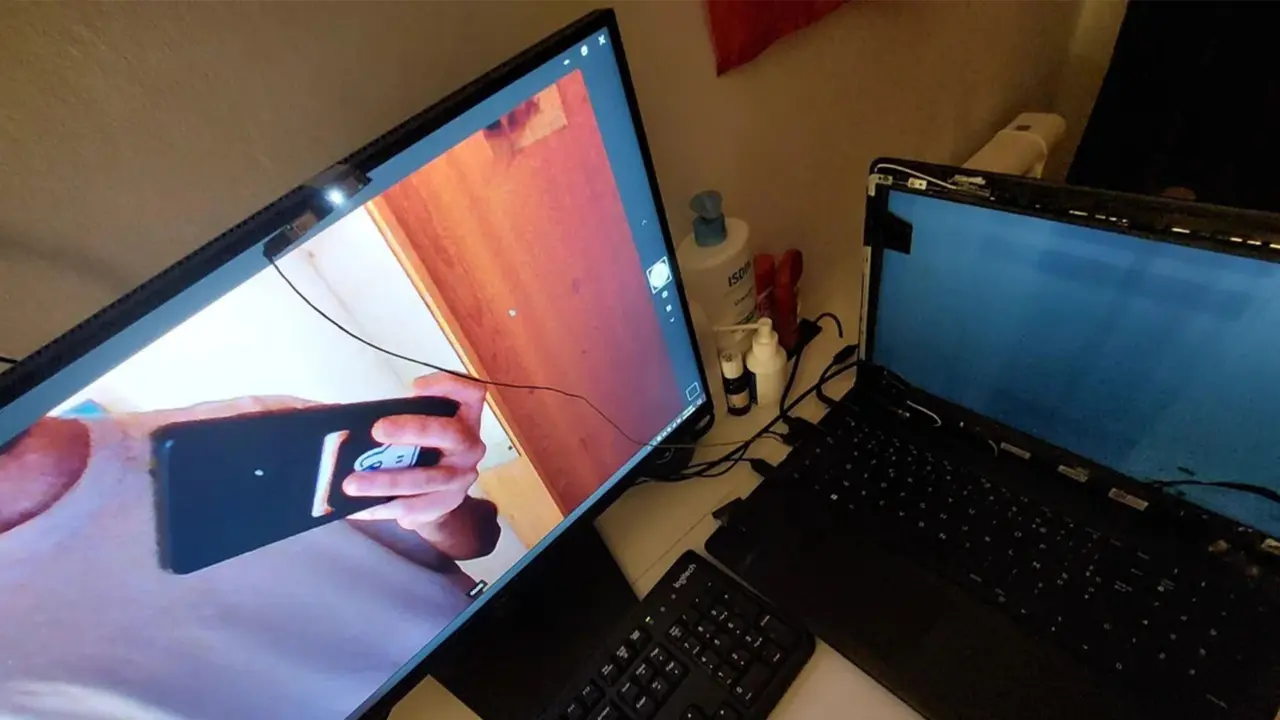
A laptop owner with a broken display found a way to keep working by turning a broken notebook into a desktop station. The user taped the laptop screen to a secondary monitor and routed the webcam through the Ethernet port to make it functional. This workaround matters because it shows how people with limited funds can extend the life of damaged hardware instead of buying new equipment.
User tapes webcam to external monitor and routes signal through Ethernet port
The device in question is a standard laptop with a shattered screen and a non-functional built-in webcam. The owner, known online as Zelawon, needed a working camera for job interviews but could not afford a display repair. He bypassed the broken internal components by physically taping the webcam to an external monitor and connecting the laptop via Ethernet.
Community members suggested using a Samsung Galaxy A52 smartphone as a webcam by connecting it via USB-C to HDMI. This idea offered a potential software-based solution for the video input problem. The laptop owner remains unsure if his Galaxy A52 is compatible with the required software to make this setup work.
Zelawon is unaware of how much longer he can maintain this makeshift webcam solution. The workaround relies on physical modifications and uncertain software compatibility. This situation highlights the financial constraints many users face when dealing with expensive hardware repairs.
Discussion
0 comments
Log in to join the thread with a thoughtful take, question, or correction.