
A second-hand laptop purchase went wrong when the buyer discovered severe overheating issues that survived a previous repair attempt. This case highlights the risks of buying used hardware where thermal maintenance may have been handled poorly. Buyers relying on pre-owned devices should inspect internal cooling systems before assuming a fix worked.
Buyer discovers unplugged fan and messy thermal paste on used laptop
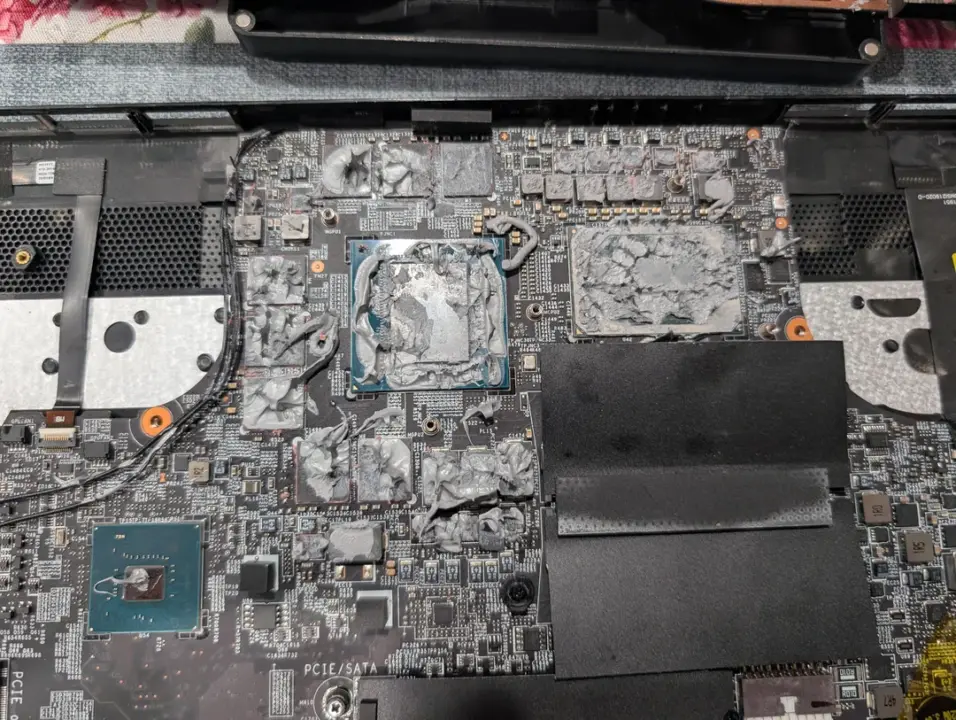
The laptop arrived with a history of thermal problems, but the seller claimed the issue was resolved by reapplying MX-4 thermal paste. When the Reddit user opened the chassis to verify the work, they found a chaotic scene inside the machine. The interior was covered in excessive thermal compound that had spread far beyond the processor area.
The thermal paste application was not just messy but dangerous to the electronics. The user reported that the paste covered motherboard components like capacitors and inductors in a thick layer. A standard repair requires only a thin layer on the chip core to transfer heat effectively.
The most critical failure was that the cooling fan connector was completely unplugged from the motherboard. Without the fan spinning to move air, the heat sink could not dissipate any heat from the chassis. The user intends to clean the motherboard with high-concentration isopropyl alcohol to remove the excess paste.
It remains unknown whether the motherboard components sustained permanent damage from the prior overheating episodes. The success of the planned cleaning and reassembly is also uncertain at this time. This incident serves as a cautionary tale for anyone purchasing refurbished electronics without a full internal inspection.

Discussion
0 comments
Log in to join the thread with a thoughtful take, question, or correction.