
Microsoft is stripping the clutter from Windows 11 Search to give users a cleaner, more private experience. The update removes the sponsored content and ads that previously cluttered search results, which matters because it restores focus to the files and apps you actually need. Users will no longer see distracting MSN widgets or Microsoft Store recommendations when looking for information on their PC.
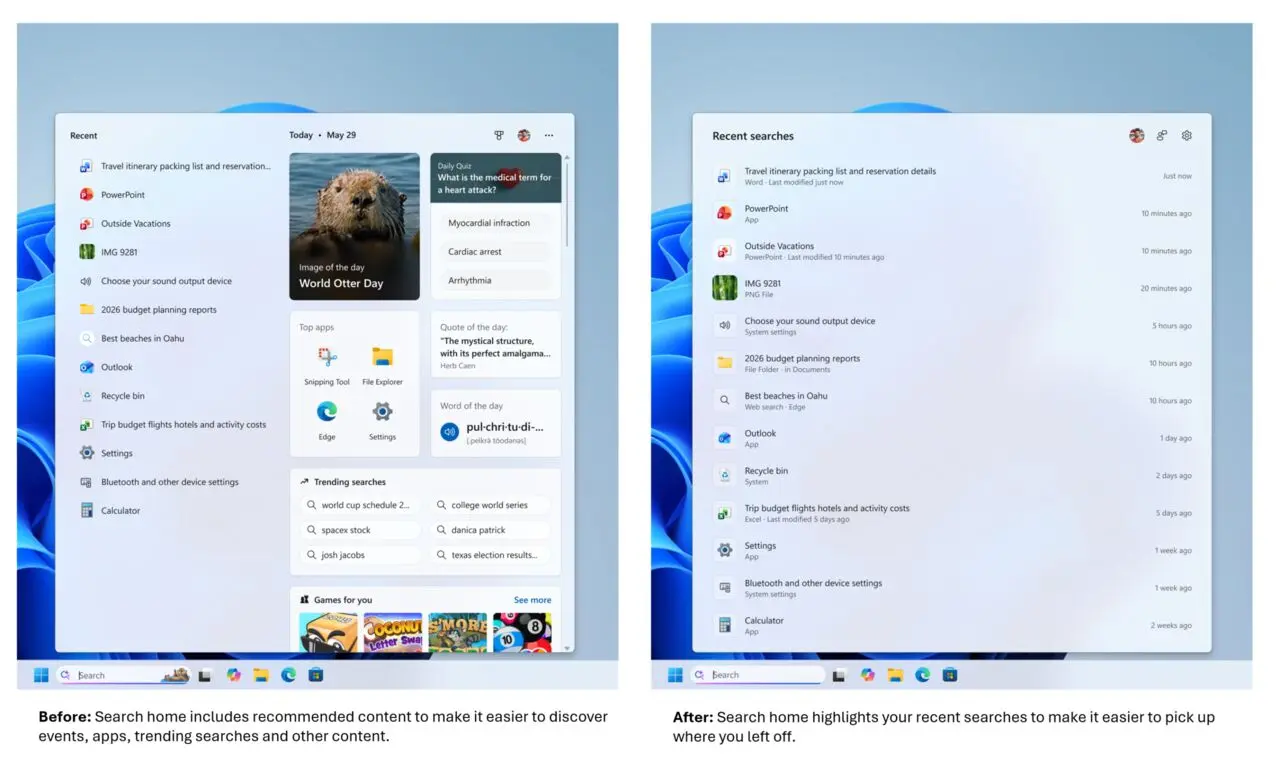
Cleaner layout prioritizes local files and removes sponsored content
This change targets the core search interface in Windows 11, shifting the design toward a simple list view. The new layout prioritizes local content over web results when the local file is more relevant to the query. Microsoft is also improving the system's ability to recognize typos and handle imprecise search terms, ensuring users find the correct results even with minor input errors.
The updated search results now clearly label their origin, distinguishing between App, Document, Settings, Web, and Microsoft Store sources. This transparency helps users understand where each result comes from without guessing. Additionally, the redesign allows users to fully disable online search sources and Microsoft Store recommendations, giving them greater control over their search behavior.
These changes are currently available through the Windows Insider Experimental channel for testers. Microsoft is rolling out the update gradually to ensure stability before a wider release. While the new features are active, the Feature Selection menu option to toggle these settings is not yet visible in test environments. We looked at the last Windows 11 update earlier while tracking similar balance and stability themes.

Discussion
0 comments
Log in to join the thread with a thoughtful take, question, or correction.