
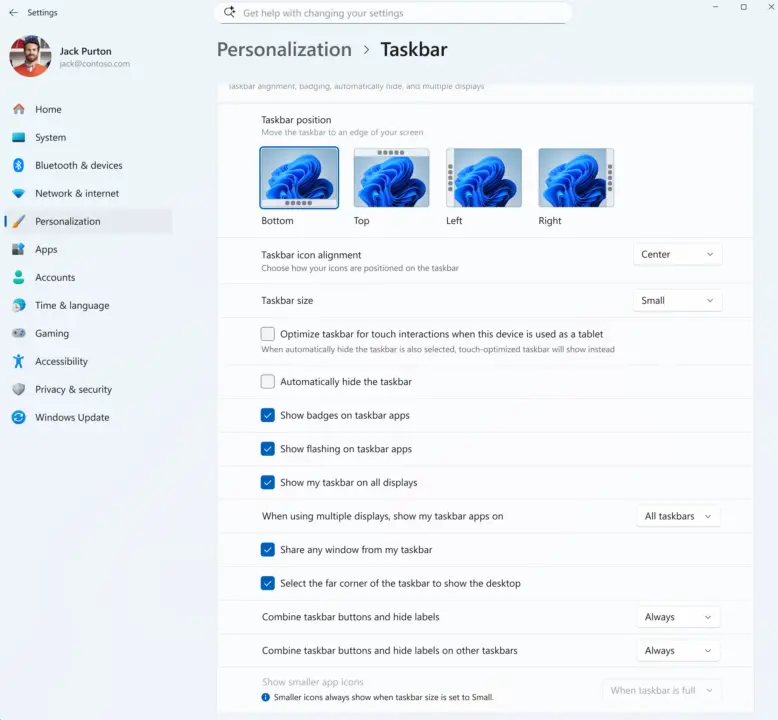
Microsoft has released new experimental builds of Windows 11 that simplify taskbar customization and aim to reduce the frequency of system restarts. These updates matter to users who want a more stable daily computing experience without constant interruptions for maintenance. The changes target two common pain points: the difficulty of personalizing the taskbar and the annoyance of multiple reboots during monthly updates.
New experimental releases add taskbar controls and unified update coordination
The update introduces three specific build numbers for different development tracks. Build 26300.8758 targets the upcoming 26H2 version of the operating system. Build 28120.2374 serves as the current 26H1 release. A third build, 29617.1000, is designated for future platforms that have not yet been named.
Build 26300.8758 adds a dedicated Taskbar Size setting directly in the Settings app. The new control simplifies taskbar height adjustments by providing a dedicated setting that eliminates the need for manual registry edits. The build also improves File Explorer thumbnail reliability for cloud files and fixes OneDrive shortcut issues when running in admin mode. Microsoft stated that these changes make the taskbar experience simpler to find and personalize.
Build 28120.2374 introduces mobile device management options within the Settings interface. It also switches the emoji panel GIF provider from Tenor to GIPHY. Build 29617.1000 focuses on reducing monthly reboots by coordinating driver, .NET, and firmware updates with the standard quality update. This unified approach aims to limit restarts to a single monthly event. The build also adds a 'Screen Tint' accessibility feature to reduce eye fatigue and enhances the Magnifier with preset zoom steps.
We looked at the last windows 11 update earlier while tracking balance and stability themes. These latest builds continue that trajectory by addressing user interface preferences and system maintenance routines. The changes provide a clearer path for taskbar personalization and a more predictable update cycle for enterprise and home users alike.
Discussion
0 comments
Log in to join the thread with a thoughtful take, question, or correction.