
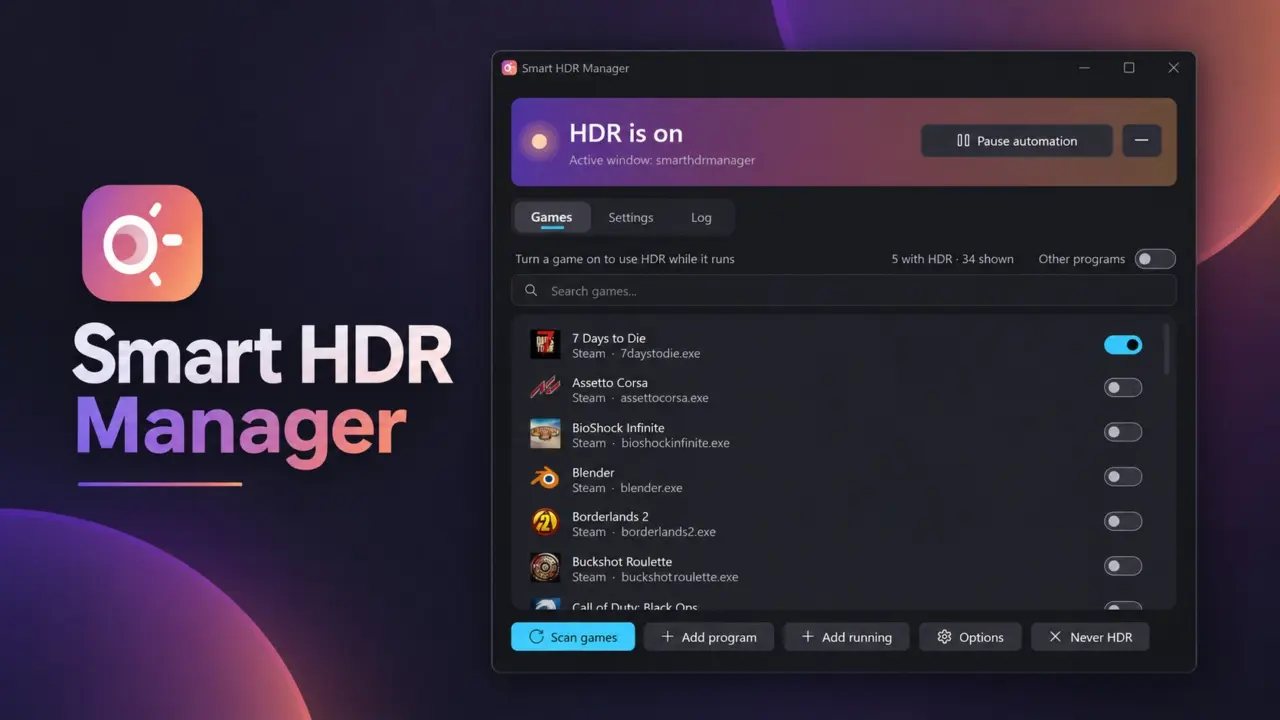
For those of you on Windows with HDR-enabled screens, changing picture modes when going from PC usage to gaming can be a chore. Thankfully, VantaCode420 has come along with Smart HDR Manager to automate that change for free. It's an open-source utility that searches your PC for certain content and adjusts HDR settings for you automatically. You won't need any admin rights to use it.
Automates HDR toggling for games and video without admin rights
Smart HDR Manager is an app that lives in the system tray silently, and it works without any telemetry data. It's aimed at those of us with OLED or HDR-enabled monitors that want accurate colors across all applications. The idea was to make sure we don't have to do any manual changes.
HDR is automatically enabled for games that it finds in Steam, Epic, GOG, or Xbox libraries. It also covers HDR movies that are locally stored and accessed with VLC, mpv, MPC-HC, and PotPlayer. Finally, there's NVIDIA RTX Video HDR support, where it can automatically convert videos to HDR on YouTube.
The app works with Windows 10 or Windows 11 and can be used standalone or with .NET. You can download it free of charge from the GitHub Releases page. It's available for global users. Compatibility with AMD and Intel GPUs and even older Windows systems haven't been fully tested yet.
The app developer said they made the program after getting sick of toggling Windows HDR manually. Now, it does it automatically for games, YouTube HDR, and RTX Video HDR. You can get the program and make your HDR experience better without spending any extra cash.
Discussion
0 comments
Log in to join the thread with a thoughtful take, question, or correction.