
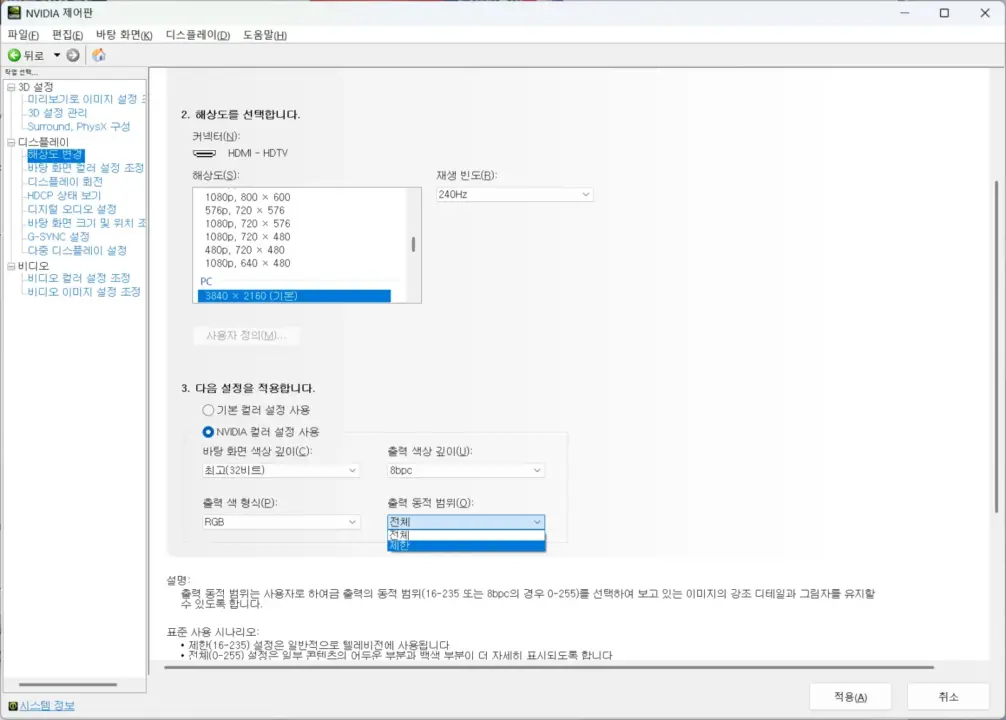
NVIDIA graphics cards continue to output a limited color range by default when connected to displays via HDMI. This behavior persists despite driver updates and has drawn criticism from users who expect full range output on PC monitors. The issue stems from how the driver interprets display device characteristics rather than a hardware defect.
Users can manually correct this issue by opening the NVIDIA Control Panel
The driver defaults to a limited color range of 16-235 when it detects TV-like EDID features on the connected device. These features include support for standard TV resolutions like 1080p or 4K, YCbCr color spaces, or specific speaker layouts. In contrast, DisplayPort connections default to a full range output of 0-255 because the protocol is designed for PC use.
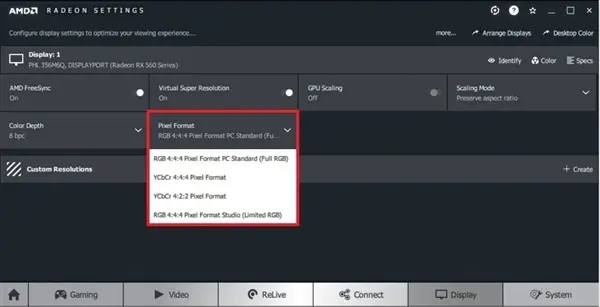
Some users compare this approach to AMD drivers which output full range by default
Users can manually correct this issue by opening the NVIDIA Control Panel. They need to change the output dynamic range setting from its default to Full. This adjustment forces the graphics card to output the full 0-255 range, which resolves the faded or washed-out appearance of dark colors on monitors that expect full range data.
Some users compare this approach to AMD drivers, which tend to output full frequency range by default on HDMI connections. This difference in default behavior has led to comments that NVIDIA was lazy in its implementation. The current logic classifies many modern PC monitors as TVs based on their resolution and signal support, triggering the conservative HDMI 1.0 standard behavior.

Discussion
0 comments
Log in to join the thread with a thoughtful take, question, or correction.