
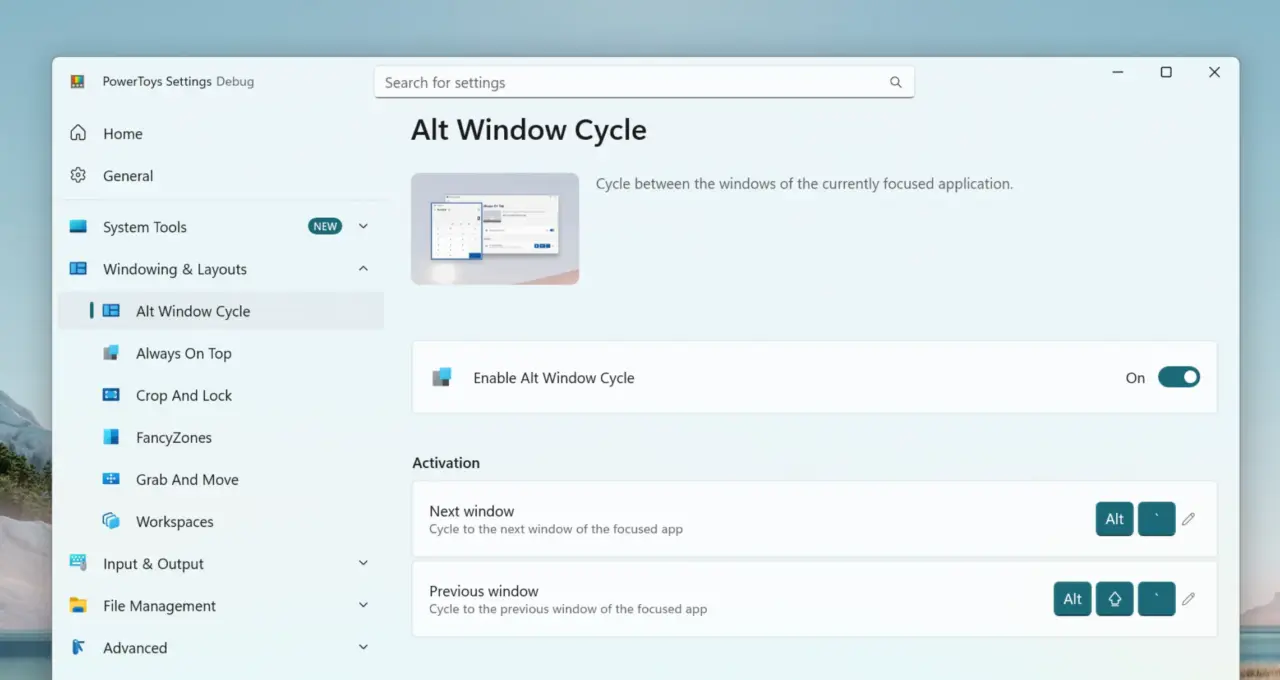
Microsoft is adding a new window management tool to PowerToys that aims to simplify how desktop users switch between open applications. The update targets productivity workflows by letting people cycle through windows within the same program without touching the mouse. This change matters because it reduces reliance on the standard Alt+Tab menu for tasks that happen inside a single app.

Version 0.100 introduces keyboard-based navigation to reduce reliance on standard menus
PowerToys version 0.100 and its follow-up patch 0.100.1 arrived recently to introduce this capability. The feature, called Alt Window Cycle, lets users press a keyboard shortcut like Alt plus the backtick key to jump between active windows in one application. The tool addresses the limitation of standard window switching, which often cycles through all open applications rather than focusing on specific windows within a single program.
The tool supports full shortcut customization so users can remap default bindings to their preferred keys. This flexibility ensures that workers who already rely on custom keyboard layouts do not lose access to the feature after updating PowerToys. This feature integrates into the existing PowerToys framework, utilizing established settings menus consistent with other tools in the collection.
Microsoft released version 0.100 as a stable update before shipping the bug-fixing patch 0.100.1 shortly after. The new window cycling feature is expected to be included in upcoming releases, complementing recent stability enhancements. This update aligns with Microsoft's strategy to enhance productivity utilities for professionals managing complex multitasking environments.
PowerToys continues as a complimentary toolkit that expands Windows capabilities beyond native operating system functions. Adding this navigation tool maintains the suite's value for users prioritizing efficient keyboard-based workflows and screen management.


Discussion
0 comments
Log in to join the thread with a thoughtful take, question, or correction.