
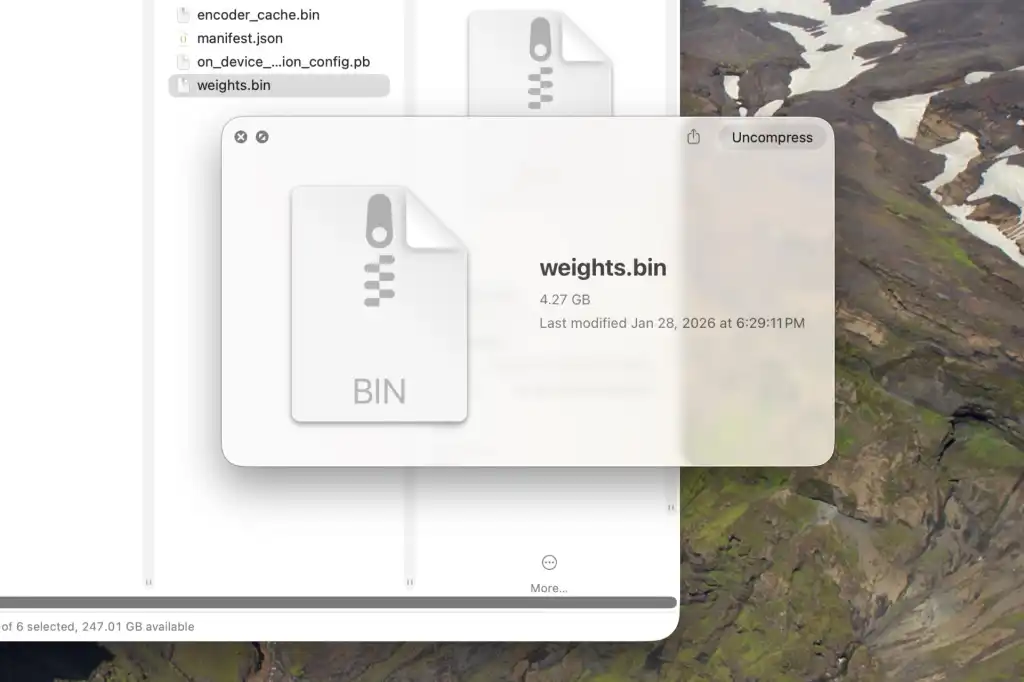
Google Chrome has begun silently downloading a 4GB local AI model named Gemini Nano to user devices. This new feature integrates directly into the browser without requiring explicit action from the user during installation or updates. The model is stored in a file specifically named weights.bin within the application data directory.
The downloaded AI model enables several local features such as text summarization, tab organization, fraud warnings, and text rewriting. On Windows systems, the file resides at C:\Users\<username>\AppData\Local\Google\Chrome\User Data\OptGuideOnDeviceModel. Users on macOS can find the same data in ~/Library/Application Support/Google/Chrome/OptGuideOnDevice Model.
Keeping a local AI model on the device can reduce latency depending on the task and better protect personal information. However, this feature takes up a significant amount of device storage space. Google provides instructions for users who wish to disable the download or remove the file manually through Chrome settings.
Users can permanently remove the file by disabling On-device AI in Chrome system settings. The setting is located within the System menu of the browser configuration options. If the weights.bin file is deleted manually while the feature remains active, Chrome will reinstall it automatically on the next launch.


Discussion
0 comments
Log in to join the thread with a thoughtful take, question, or correction.