

A new open-source software layer called low_latency_layer brings Nvidia Reflex 2 and AMD Anti-Lag 2 to any GPU on Linux, including Intel graphics. The project was started by developer Nicolas James, who was frustrated with the state of AMD Anti-Lag 2 on Linux. According to James, the Mesa implementation of Anti-Lag 2 had stability issues and was disabled by default, and its latency improvement fell short of the proprietary Windows version.
Developer Nicolas James created the layer out of frustration
Low_latency_layer works as a Vulkan layer that intercepts device extensions. James tested the software on a 540 Hz monitor with Nvidia Reflex Analyzer, measuring latency in games including The Finals, Counter-Strike 2, Cyberpunk 2077, Resident Evil Requiem, Marvel Rivals, and Overwatch 2. Benchmarks from Korthos Software indicate that the Linux implementation can outperform native Windows versions of Nvidia Reflex and AMD Anti-Lag.
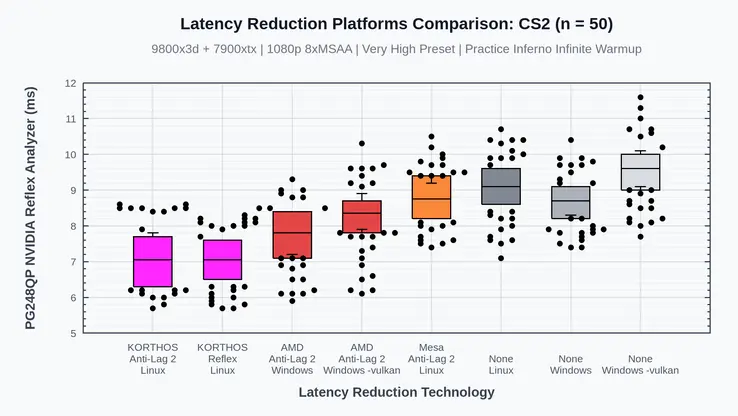
The software can be manually installed on Steam Deck and Steam Machines running SteamOS. No pricing or availability details have been announced.
James noted that after getting Anti-Lag 2 working, he realized a similar implementation for Nvidia Reflex was straightforward. He described the process as tedious, involving clicking a button and recording values into a spreadsheet. The project aims to give Linux gamers low-latency features regardless of their GPU vendor.
Korthos Software has not confirmed a formal release timeline or broader distribution plans for low_latency_layer. The project remains available for manual installation by users comfortable with Linux software setup.

Discussion
0 comments
Log in to join the thread with a thoughtful take, question, or correction.