
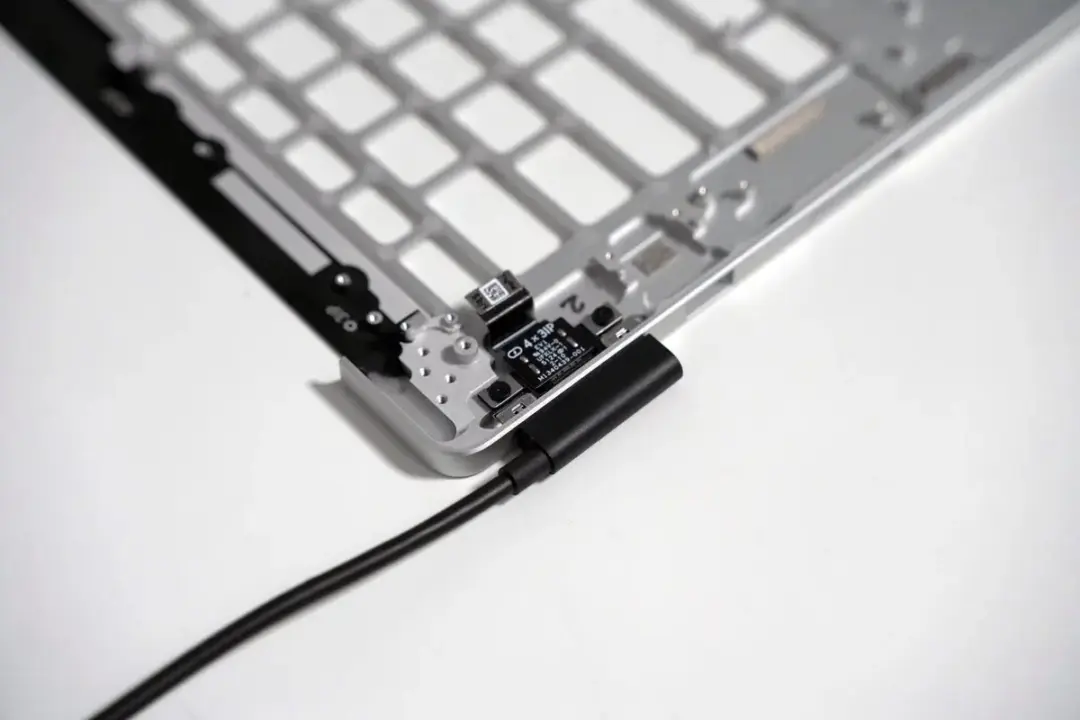
Microsoft published the engineering behind the magnetic USB-C cable it uses on Surface, making charging your laptop easier. The engineering design eliminates any friction of accurate manual placement when attaching the cable. What's the significance? It saves you from having to physically push to connect power to your surface laptop or tablet.
Hundreds of design iterations refined the magnetic alignment for easier laptop charging
The Magnetic USB-C port now has a magnetic alignment feature that helps in placing the connector. Marcus Ash, which handled the latest round of hardware testing, said they improved the magnet placement by 0.7mm. This improvement makes the cable easily click in place and magnetically snap in without much effort.
Surface USB-C Cable Specifications
- Magnet Position Adjustment: 0.7mm
- Connector Type: USB-C with magnetic alignment
- Design Iterations: Approximately 300
- Durability Testing: Thousands of plug/unplug cycles
- Features: Reversible insertion, LED indicators
They went through hundreds of design revisions, roughly 300, to make sure the magnetic field accurately directs the connector to the right place. The magnetic cable goes through thousands of plug/unplug tests. The cable is put through angled pull tests and load testing to ensure the magnetic cable has the durability to last. These tests make sure that the magnetic cable provides a steady connection during normal use.
There's reversible cable insertion. Notification of the cable connection, with LED indicators to give you status updates. Not to mention, you can use this cable to charge other USB-C devices. Yes, that includes smartphones.
No need to deal with accurate manual placement. The magnetic field makes sure the cable clicks in place.
Microsoft confirmed that the 0.7mm change in magnet placement removes the worry of accurate manual placement. The cable connector self-aligns, and magnetically snaps in place easily without much effort.
The goal of the design was to make the connection easier. Simply put, the cable will self-align automatically.

Comments (0)