
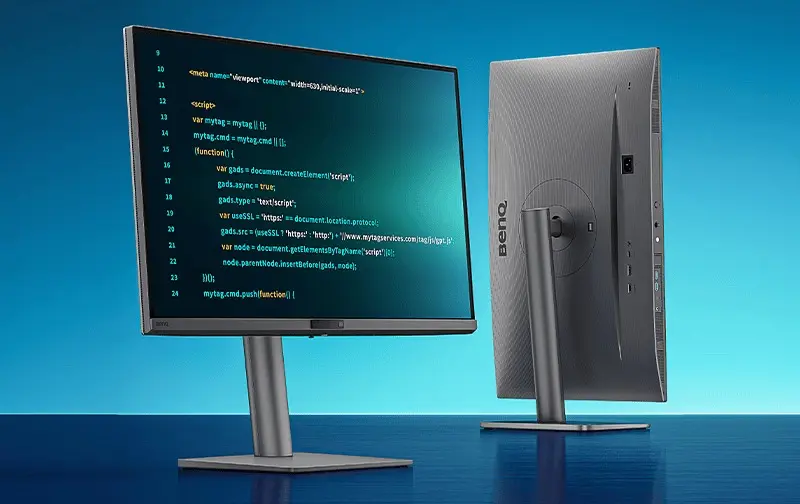
BenQ launched the RD270Q monitor in China on April 30, 2024. The monitor includes a dedicated Coding Mode. The BenQ RD270Q monitor features a 2560×1440 resolution. It operates at a standard 144Hz refresh rate for smooth visual output.
The display utilizes an 8-bit color depth and covers 99 percent of the sRGB color gamut. Static contrast ratio measures at 1300:1 with a peak brightness of 300 nits. The panel offers a 5ms gray-to-gray response time. The monitor offers 99% sRGB color gamut coverage and a 5ms GtG response time.
New 27-inch display features dedicated coding mode and ambient light sensor
BenQ included a dedicated Coding Mode to optimize text clarity for programming tasks. The monitor also features an ambient light sensor to adjust screen settings automatically. Ergonomic adjustments include 130mm of height adjustment and 90-degree vertical rotation. The stand supports 130mm height adjustment and 90-degree vertical rotation.
Connectivity options include one HDMI 2.0 port and one DisplayPort 1.4 input. A 65W USB-C port provides power delivery alongside data transfer. The unit also offers two USB-A 3.2 Gen 1 ports for KVM functionality and a 3.5mm audio jack. The monitor includes KVM functionality to facilitate switching between two computers.
BenQ RD270Q Specifications
| Feature | Specification |
|---|---|
| Resolution | 2560×1440 (2K) |
| Refresh Rate | 144Hz |
| Response Time | 5ms GtG |
| Color Gamut | 99% sRGB |
| Connectivity | HDMI 2.0, DP1.4, USB-C |
The RD270Q retails for 3299 CNY, which is approximately $482 USD. It became available on JD.com starting on the announcement date. The monitor is priced at 3299 CNY (approximately $482). The BenQ RD270Q is available in China with a dedicated Coding Mode for developers.

Discussion
0 comments
Log in to join the thread with a thoughtful take, question, or correction.