
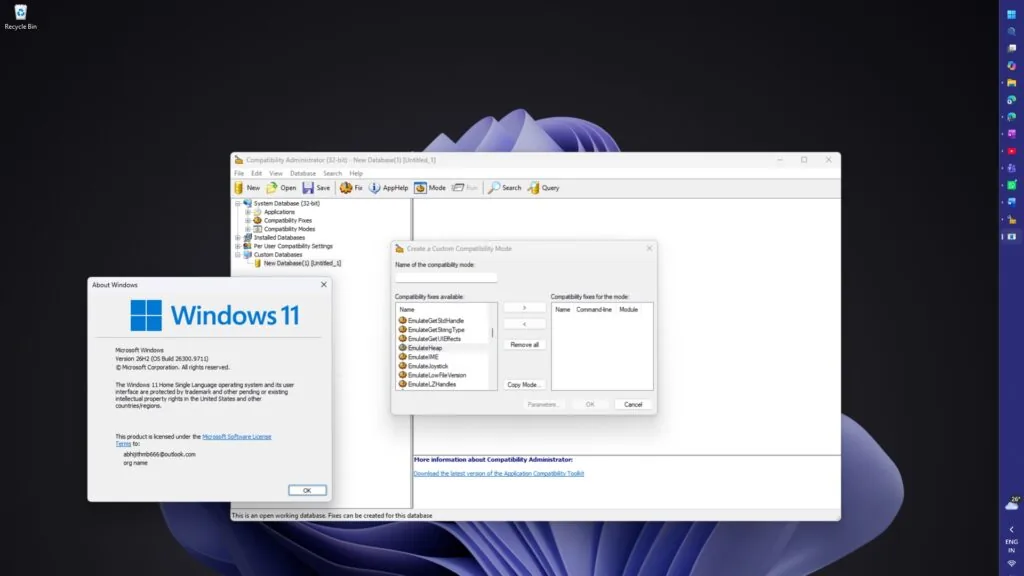
Microsoft is preserving an old Windows 95 era memory management feature in Windows 11 26H2 for legacy game compatibility. The legacy code is used for preventing crashes in older games using deprecated memory management techniques. Users who play legacy software will not notice any differences in stability thanks to the fact that Microsoft kept this particular piece of code. Backward compatibility is more important than a fresh slate for the OS core.
Microsoft preserves Windows 95-era memory management code in Windows 11 26H2 to prevent crashes in legacy games like SimCity.
'EmulateHeap' is the name of the particular feature being kept. It's from the Windows 95 era. Microsoft introduced this feature in order to fix use after free memory issues with legacy Windows 3.x software.
A common source of these issues was games like SimCity that would not do memory deallocation properly. EmulateHeap would defer these memory deallocations to avoid those memory crashes common to early PC games.
EmulateHeap works by hooking legacy memory API calls. It emulates Windows 95 implementations. It specifically hooks things like HeapCreate, LocalLock, and GlobalReAlloc so that they do the right thing.
EmulateHeap is not something enabled by default for all apps in Windows 11. It's only enabled for legacy app handling when you explicitly turn it on for certain apps through the Compatibility Administrator.
Microsoft made the decision to keep this exception handling in place instead of requiring game developers to fix their own code. This makes it possible to play legacy games on modern hardware without having to update the source code. It's another example of Microsoft's long-standing efforts to maintain the ability to access legacy Windows environments. We saw similar discussions of balance and stability in the last Windows 11 update that we discussed.

Discussion
0 comments
Log in to join the thread with a thoughtful take, question, or correction.