
Windows 11 users with modest system memory are noticing a significant drain on resources from the default Weather app. The built-in utility now consumes over 1 gigabyte of RAM in active use, a figure that rivals many dedicated applications. This behavior matters because it directly reduces the memory available for other tasks on budget PCs. Users with 8GB or 16GB of RAM may experience slower performance when this app runs in the background.
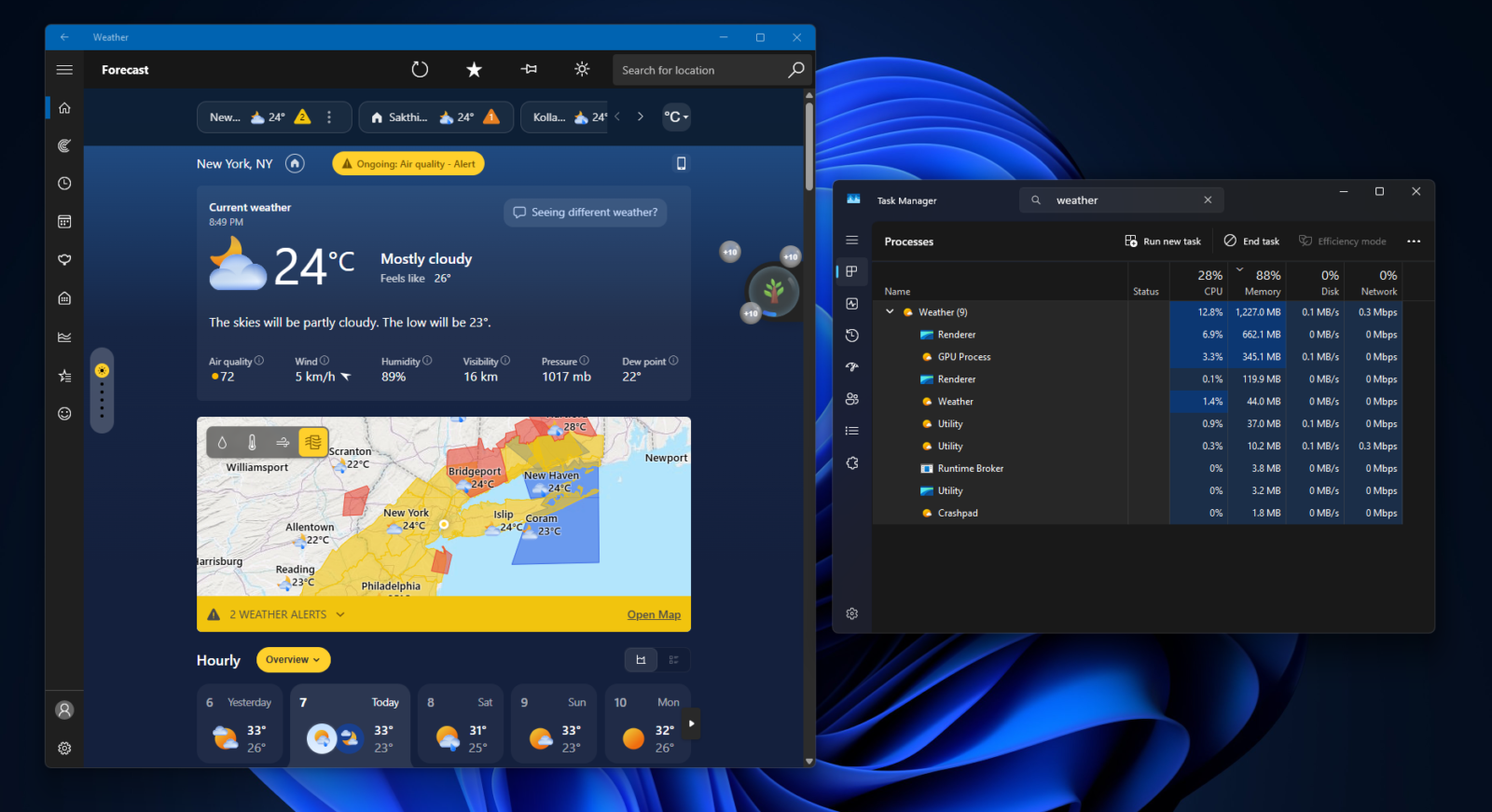
Microsoft utility consumes up to 1.6GB RAM on Windows 11 systems
The application in question is the standard Weather app preinstalled with Windows 11. Microsoft built this version using the WebView2 framework, which allows it to render the MSN Weather web app inside the OS shell. This architecture means the app is not a native WinUI application written specifically for Windows. Instead, it functions as a web view container that loads content from Microsoft's news and weather services.
Performance measurements show the app uses between 500 and 600 MB of RAM when idle. Memory usage spikes to 1.2 GB during normal operation and can reach 1.6 GB during heavy interaction. This consumption is roughly five times higher than the default Weather app on macOS, which uses less than 250 MB under similar conditions. On a system with only 8 GB of RAM, the Windows app can occupy nearly 20 percent of total system memory.
The high memory footprint stems from the app's reliance on web technologies and embedded content. The forecast feed includes sponsored content and advertisements that require additional resources to load and render. Microsoft has stated it is working to improve the performance of its recent operating system updates. It remains unclear whether the company will rebuild the Weather app as a complete native application based on WinUI in the future.
We looked at Windows 11 drops 32GB RAM recommendation earlier while tracking Microsoft launches. The current situation highlights a tension between feature-rich web-based utilities and system efficiency on lower-spec hardware. Microsoft should optimize the application's memory footprint to maintain system performance for Windows 11 users. The app will continue to use significant resources until a structural change is implemented.

Discussion
0 comments
Log in to join the thread with a thoughtful take, question, or correction.