
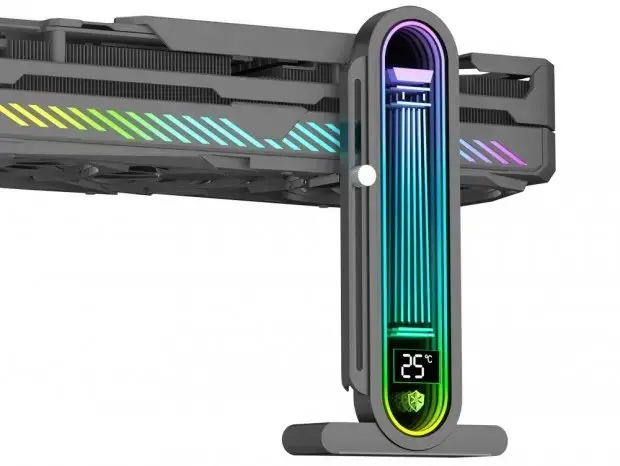
Innex has just released a new add-on for those PC enthusiasts who would like to check the thermal conditions of their builds without having to open the case. The Atlas Pillar is a handy gadget that fills in the blanks we have about our PC build and helps to monitor the internal temperature of the cases on a visible component. Such data is very important as you can keep an eye on how hot it is inside the case and you can take extra steps to keep the sensitive components such as your graphics card running at optimal temperatures.
Innex releases a GPU support brace that displays internal case temperature on an ARGB infinity mirror
As for the Atlas Pillar, it serves as a GPU support brace but it brings with it an extra feature to monitor the environment. The Pillar is made of aluminum and has an infinity mirror with 16 stages of ARGB LEDs inside. It connects to the motherboard's software and thus can be a part of the aesthetics of your custom PC build. But it's not just for looking good as it has some very practical uses too.
Specifications
- Model Number: BA-VHD01AP-BK
- Temperature Range: 0~99℃
- LED Type: 16-stage ARGB
- Height Adjustment: 39~158mm
- Material: Aluminum
The device's temperature reading goes from 0 to 99 degrees Celsius. The reading can be viewed from the back of the device. As for its height, it can be adjusted from 39mm up to 158mm.
All you have to do is use the handle screw to change the height of the pillar. This makes it very versatile for any kind of GPU and any PC case layout. The Atlas Pillar's dimensions are 93mm for width, 42mm for depth and 191mm for height. Its model number is BA-VHD01AP-BK.
The price for the Atlas Pillar starts from 3,680 JPY (about $23.24) and up to 4,080 JPY (about $25.76). depending on the model you buy. You can find it in Japan starting November 25, 2026. It's a small addition that can make a difference in your PC build if you want something to support the GPU and see how hot your PC is getting.
A temperature sensor in a GPU bracket is just another way to measure ambient air. It does not tell you the hotspot or junction temp of the die itself. We need independent thermal validation before this becomes a standard feature.
The price for a piece of aluminum that glows is honestly wild 💀
I am curious about the polling rate. Does it update every second or does it lag behind the actual thermal curve of the card. That could be annoying for monitoring.
The article says it connects to motherboard software. That implies a driver dependency. I prefer devices that work with standard ARGB protocols without installing bloatware. Hope Innex keeps it simple.
Is the sensor placed near the bottom of the GPU or higher up near the middle. The heat distribution varies a lot between different card designs.
The specs list the dimensions as 191mm tall. This usually means it sits near the mounting point. It likely measures the air right at the bracket interface. That is not the hottest part of the card.
I doubt this measures anything useful for the GPU itself. It will just show the hot air rising from the PSU or the bottom of the case. It is a gimmick at best.
Just another accessory to clutter my desk. I will stick to my existing fans.
I will wait for reviews to see if the aluminum actually helps with heat dissipation or if it is just a heat sink for the sensor.