
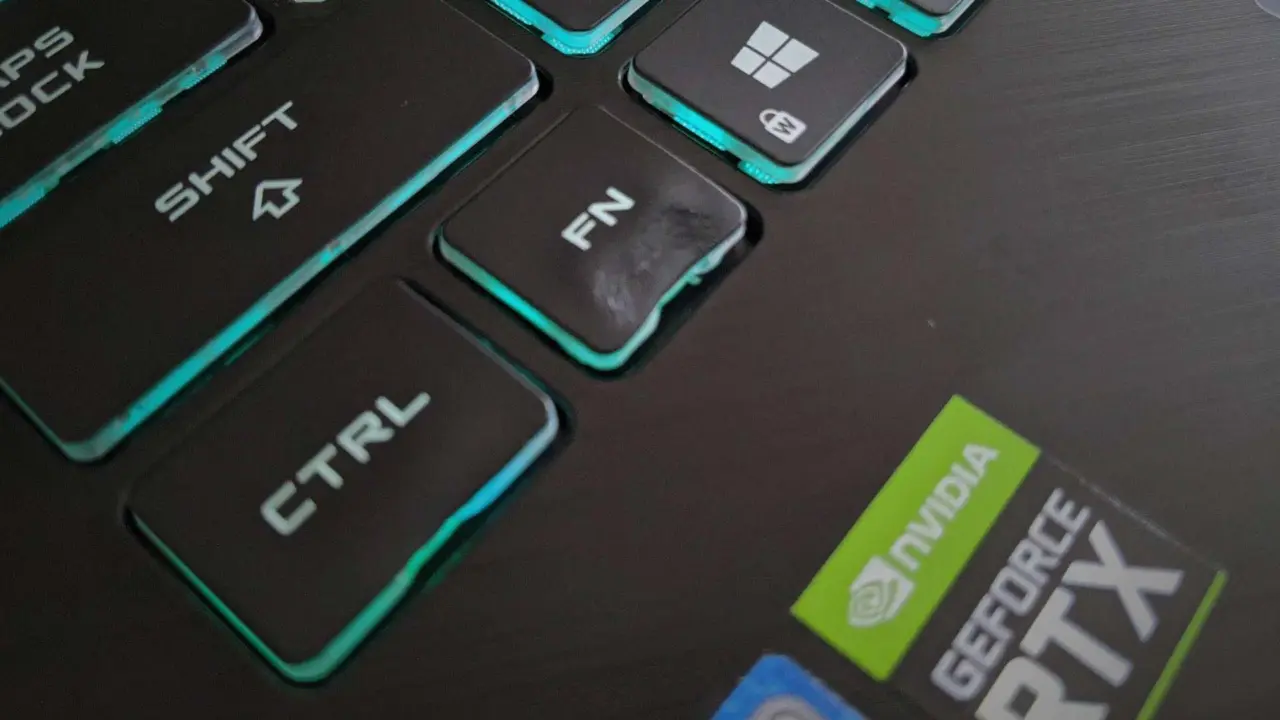
A recent incident on Reddit shows how quickly standard laptop components can fail under improper cleaning methods. A user attempted to remove CPU and GPU stickers from a gaming laptop using a high-power hair dryer. The result was a melted keycap, highlighting a significant risk for owners who try DIY maintenance on their devices.
Standard plastic keycaps deform under heat from household hair dryers
The incident involved a generic gaming laptop with standard ABS or thin PBT plastic keycaps. These materials are common in the market but have a low thermal tolerance. The keycaps began to physically deform at approximately 80 degrees Celsius, which is well within the output range of many household hair dryers.
Hair dryers can easily reach temperatures between 60 and over 100 degrees Celsius at close range. This heat level exceeds the deformation threshold of the plastic keycaps. The user employed a 2000W device, which likely generated even higher localized heat, causing immediate damage to the keycap structure.
The recommended alternative for removing stubborn stickers is isopropyl alcohol with a concentration greater than 90 percent. Applying this solvent to a microfiber cloth or cotton swab allows for gentle cleaning without thermal stress. This method avoids the physical deformation risks associated with heat guns or hair dryers.
Replacement costs for a single chocolate keycap are low, often costing only tens of RMB. While the low cost of a single chocolate keycap limits the financial loss, the repair cannot fully restore the original appearance. Users should consider whether the expense of a replacement is worth the risk of damaging nearby components during manual removal.
Discussion
0 comments
Log in to join the thread with a thoughtful take, question, or correction.