
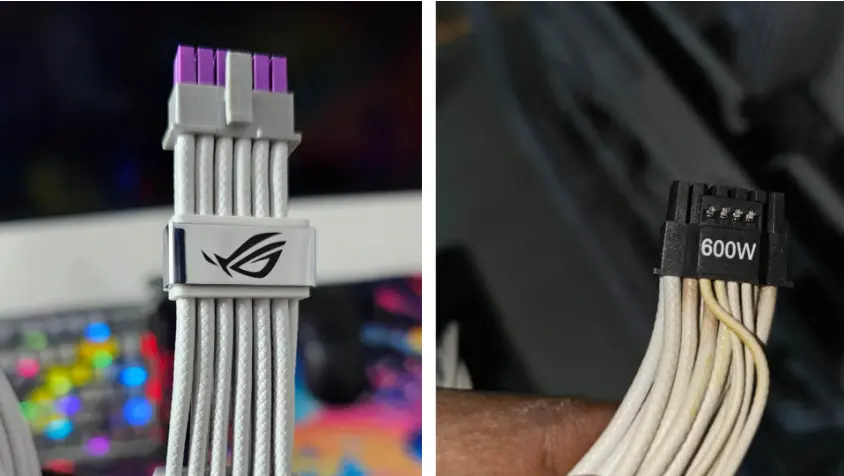
High-end graphics cards face a critical stability threat when their stock power cables fail to deliver consistent voltage under heavy loads. This issue forces RTX 5090 owners into a difficult position where system crashes and hardware damage become likely during intensive gaming sessions. We need to look at how a specific third-party accessory addresses this dangerous gap in power delivery standards.
Third-party accessory stabilizes power delivery under heavy load
An RTX 5090 user recently shared test results showing that the stock 12VHPWR cable causes significant voltage drops and thermal issues. The user reported that the cable turned brown and led to random system reboots because the 12V rail fell to 11.2V. This voltage level sits below the ATX standard minimum of 11.4V, which creates an unstable environment for the GPU.
Specifications
- 12V Rail Voltage (Stock Cable): 11.2V
- 12V Rail Voltage (ROG Cable): 11.9V-12V
- Voltage Drop Reduction: 87.5%
- Stock Cable Temperature: ~80°C
- Load Range: 600W-635W
The user replaced the stock cable with the ASUS ROG Equalization Cable to test its performance under high load conditions. This swap reduced the voltage drop by 87.5 percent and stabilized the 12V rail between 11.9V and 12V. The stock cable reached temperatures near 80°C during the 600W to 635W load test, while the ROG cable maintained a cooler and more stable operation.
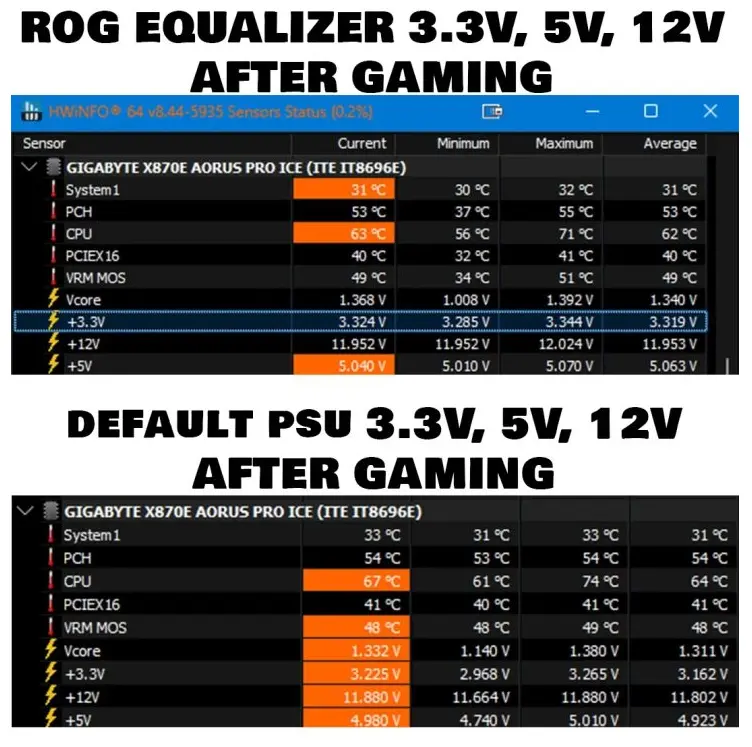
This hardware fix resolves the immediate instability problems for users experiencing brown discoloration or frequent crashes with their original cables. While we previously examined the RTX Spark mini PC during our coverage of NVIDIA launches, this specific cable issue warrants dedicated attention for high-end builders.
The ASUS ROG Equalization Cable provides a verified solution for stabilizing power delivery on RTX 5090 systems under heavy load. Users can now rely on this accessory to maintain voltage within safe limits and prevent the thermal and stability issues caused by the stock cable. We've been tracking ROG Equalization Cable closely — see our earlier coverage on DisplayPort 2.1 Cable Problem.


Discussion
0 comments
Log in to join the thread with a thoughtful take, question, or correction.