
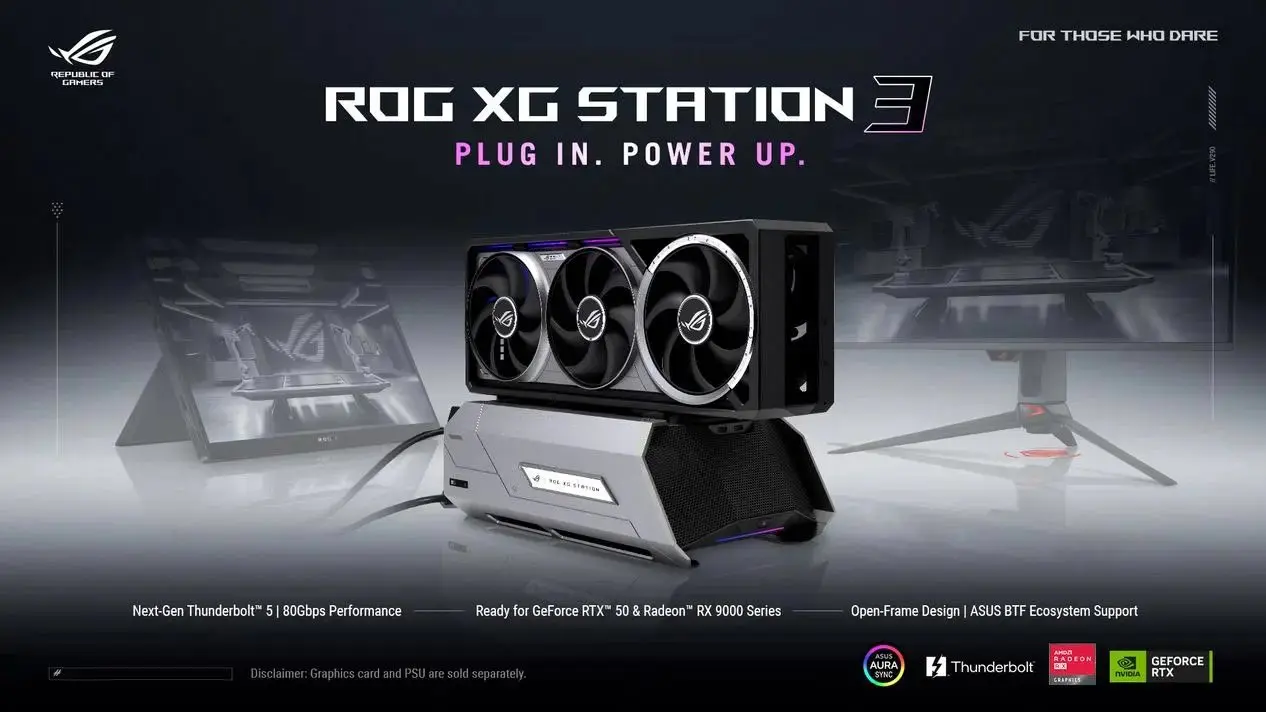
ASUS has announced the new ROG XG Station 3 external GPU enclosure which aims to fill the performance gap for gaming laptops. This is important because it's finally Thunderbolt 5 connectivity that is coming to the eGPU world with a massive increase in bandwidth. This means that gamers and creators using portable gaming rigs can now harness the power of top-tier desktop graphics cards without being limited by old connection technologies.
ASUS introduces an external GPU enclosure featuring Thunderbolt 5 connectivity and a specialized slot for Back-To-The-Front graphics cards.
The new dock boasts an impressive 80Gbps bidirectional data rate (which can go up to 120Gbps with bandwidth boost). So you can rest assured that modern graphics cards can exchange information with your laptop at near native speeds.
Specifications
- Interface: Thunderbolt 5
- Bandwidth: 80Gbps bidirectional, up to 120Gbps with boost
- Power Delivery: 140W USB PD
- GPU Compatibility: NVIDIA GeForce RTX 50/PRO 6000, AMD Radeon RX 9000, Intel Arc
- Special Slot: GC-HPWR slot for BTF 2.5 GPUs
The XG Station 3 comes with an open frame chassis that focuses on airflow and giving a view of the hardware inside. It has a special GC-HPWR slot that's meant for Back-To-The-Front (BTF) 2.5 graphics cards. This means you can slot in BTF compatible graphics cards like the RTX 5080 or 5090 BTF without any visible power cables.
This is great for those who want to have a clean desktop setup while also using the latest GPU architecture. The dock supports NVIDIA GeForce RTX 50 and PRO 6000 series graphics cards. It also supports AMD Radeon RX 9000 series graphics cards as well as Intel Arc series.
In terms of power, the dock has 140W USB Power Delivery output to power compatible laptops while transferring data. So there's no need for a separate power brick for your host laptop. This makes for a much neater desk setup.
The rear Thunderbolt 5 port allows for daisy-chaining up to 3 4K displays. This increases your visual workspace as a content creator. For front I/O, you get two USB 10Gbps Type-C ports for quick and easy access to peripherals. This connectivity makes sure you can hook up multiple high-res monitors along with fast storage devices at the same time.
We've previously covered ASUS Zephyrus G14 Owner Claims RAM controversy and it's just how important it is to have good hardware support. The ROG XG Station 3 is a step forward towards better performance standards for external connectivity. So if you're someone who wants to upgrade your laptop gaming experience, you should be looking out for this dock if you have Thunderbolt 5 compatible machines.
Now we don't have details on pricing and availability so that's something consumers will have to wait and hear more on. This is really for those who value raw bandwidth and clean looks for their gaming setup.
Does the 80Gbps bidirectional rate hold when daisy-chaining three 4K displays simultaneously, or does the bandwidth split create a bottleneck for the GPU?
The spec sheet lists 80Gbps bidirectional as the base Thunderbolt 5 throughput. The 120Gbps boost likely applies to direct device-to-host transfers. Daisy-chaining monitors usually consumes significant bandwidth on the upstream link. You would need to check if the dock allocates fixed bandwidth per port or shares the pipe dynamically.
The article mentions BTF 2.5 cards. The GC-HPWR slot is specifically for the Back-To-The-Front 2.5 standard. This removes visible power cables by routing them through the motherboard interface. It is not just a standard PCIe slot with a different cable.
I am skeptical about the 140W USB PD being sufficient for an RTX 5090 BTF under full load. The GPU itself draws power from the dock, but the host laptop might sag if it is pushing heavy workloads while charging.
finally a dock that doesnt look like a black brick hiding in the corner 😅
The open frame design is cool but will the fans get loud when pumping air through that BTF card? Noise is the real killer for desktop setups.
I just hope the footprint fits on standard desks. Those BTF cards can be massive and the dock looks wide enough to swallow my monitor arm base.
Waiting for the price. If this costs more than the GPU inside it, I will stick with my old docking station. Reliability matters more than new ports.