

Microsoft is adding a one-click uninstall button for AI components in the latest Windows 11 Experimental preview build. The feature targets users who want to reclaim disk space occupied by locally installed models like Phi Silica.
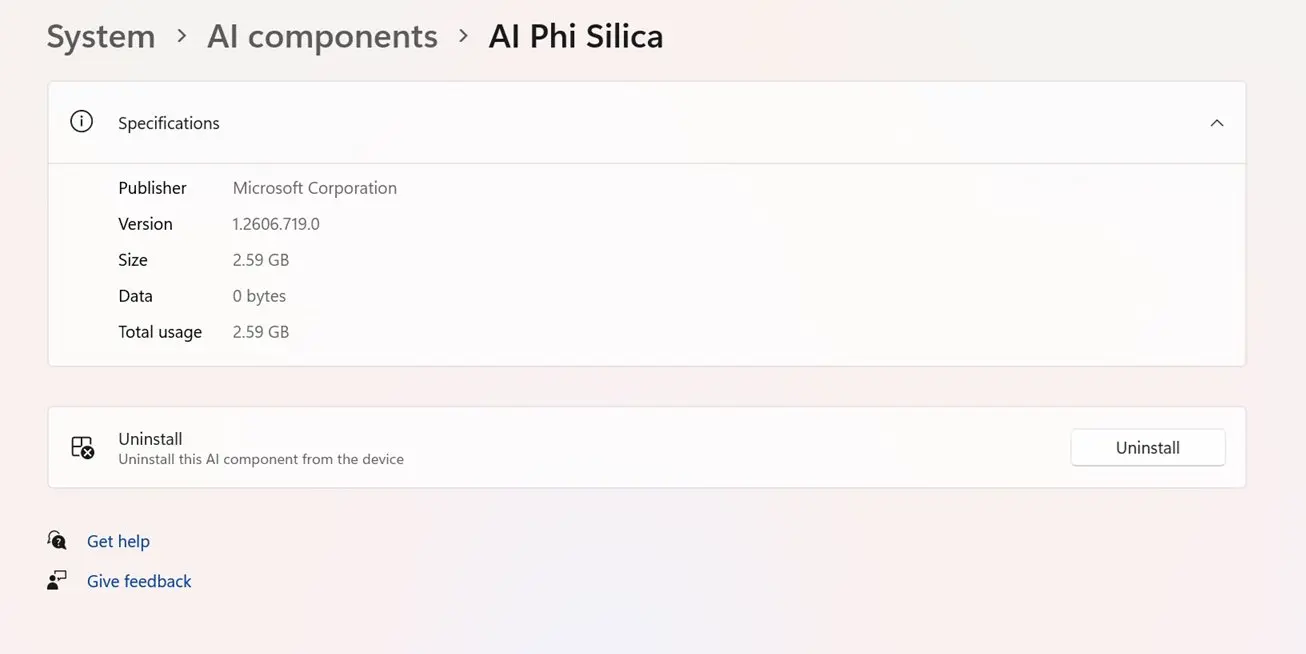
Experimental preview build allows direct removal of locally installed models like Phi Silica to reclaim storage.
The update arrives in build 26300.8553, part of Microsoft's ongoing experimental track. It introduces a new control within the AI settings menu that allows direct removal of companion software packages.
Phi Silica is a compact language model designed for NPU tasks. According to source reports, it consumes over 2.5 GB of disk space on typical systems. The uninstall button provides immediate access to this storage without requiring manual file deletion.
Users can trigger the removal process through the new interface element. After initiating the uninstall, the system requires a reboot to complete the cleanup. The process removes related system files and configuration data upon rebooting.
The exact amount of space saved depends on which AI models are currently installed. Source claims suggest significant reductions for users with multiple components. However, precise savings vary based on individual configuration and model versions.

Discussion
0 comments
Log in to join the thread with a thoughtful take, question, or correction.